 Nixring
Spam call blocker for iPhone that never sees your calls
Nixring hands iOS a list of spam numbers and steps out of the way. No account, no contacts upload, no server that receives your call history, because there is no server at all.

Free to download. iOS 17.0 or later. Rated 5.0 out of 5 from 2 App Store ratings.
- Price
- Free, Pro from 4.99 USD
- Built-in list
- 80 numbers
- Account required
- None
- App Store rating
- 5.0 from 2 ratings
Inside the app
What you actually get
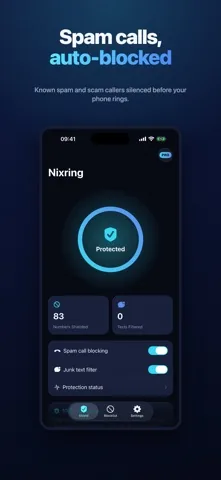
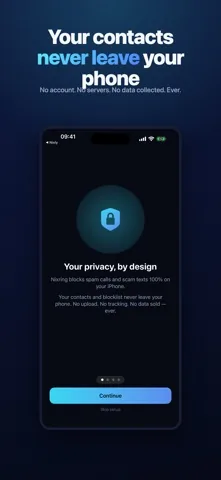
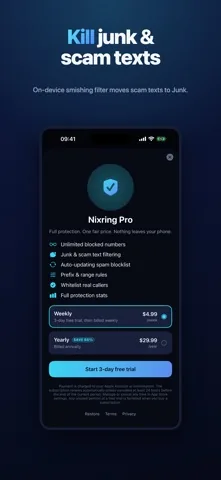
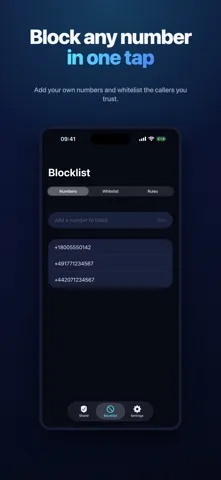
The honest number
The built-in list holds 80 numbers
Every spam blocker on the App Store claims a database. Here is the exact contents of the file that ships inside Nixring, counted from the source rather than rounded up for a marketing page.
- +49 90020German premium rate numbers, labelled as premium-rate spam
- +49 18015German shared cost numbers, labelled as shared-cost spam
- +49 13715German televoting numbers, labelled as televoting spam
- 10 codes30Callback bait prefixes in +216, +223, +225, +233, +234, +252, +371, +373, +679 and +881, three per code
- Total80numbers in the list every install starts with
Read that as a starting point, not a shield. Eighty numbers will not stop a determined operator, and the German ranges will do nothing for a caller in another country. The list matters most for the ranges that never change: premium-rate numbers and callback bait. Everything beyond that comes from the numbers you add, the prefix rules you write, and the list update in Nixring Pro.
Features
Five things it does
Blocking through Apple's Call Directory
Nixring gives iOS a sorted list of numbers to reject. iOS does the rejecting, before the phone rings and before any app is involved. Nothing runs in the background and nothing drains the battery.
Your own numbers and a whitelistFree up to 10
Add any number by hand. A whitelist entry outranks every list and every rule, so a number you trust is never blocked by anything Nixring builds. The free version honours the first 10 numbers you add; Nixring Pro removes the limit.
Junk and scam text filteringPro
A Message Filter extension checks texts from senders you have never written to and moves the bad ones to the Junk folder without a notification. It matches 28 scam phrases, 16 suspect domain endings and 10 link shorteners, all offline. Message content is never stored or sent.
Prefix and range rulesPro
Block a whole block of numbers at once, for example everything starting +49 900. A rule takes a prefix and 1 to 5 trailing digits, which covers 10 to 100,000 numbers in one entry.
List updatesPro
Pro refreshes the list from one public file at nixring.vercel.app/blocklist.json. The request carries no identifier, uses a cache tag so an unchanged file costs nothing, and fails quietly when you are offline.
Call blocking with the built-in list is free. Pro is optional.
Why privacy is structural here
The extension is never told about a call
A caller ID app has to send every incoming number somewhere to look it up. That is how it names an unknown caller, and it is also why it needs your data. Nixring works the opposite way around.
-
iOS asks for a list
When you switch Nixring on, or when the app asks for a reload, iOS starts the Call Directory extension and requests the full set of numbers.
-
The extension answers and exits
It reads the numbers from a file on your phone, hands them over in the order iOS requires, and stops. It makes no network request while it does this.
-
iOS blocks on its own
From then on iOS matches incoming calls against that list. The extension is not started again, is not told who called, and is not told what was rejected. There is nothing for Nixring to collect, because nothing is ever handed to it.
The same design keeps the app modest. Nixring cannot tell you the name of an unknown caller, and it cannot flag a number nobody has reported yet. If that is what you need, a lookup service is the better tool, and the comparison page says so plainly.
Setup
Two switches in Settings
-
Open Nixring once
The first launch registers both extensions with iOS. Until you do this, the switches below will not appear.
-
Settings, Apps, Phone, Call Blocking and Identification
Switch on Nixring. Call blocking starts immediately and keeps working whether or not the app is open.
-
Settings, Messages, Unknown and Spam, SMS Filtering
Switch on Nixring for junk text filtering. This step needs Nixring Pro, because the filter itself is a Pro feature.
Limits
What Nixring cannot do
- It cannot name an unknown caller. There is no lookup and no directory of names.
- It cannot answer a call, record one, or waste a scammer's time. iOS gives no third-party app that power.
- It cannot count blocked calls, because iOS reports none back.
- It cannot block a number that is not on your list or inside one of your rules.
- It cannot filter texts from people already in your Messages history, because iOS only routes unknown senders to a filter extension.
Everything above is a limit of the iOS APIs, not a feature waiting in a later release. Any app promising otherwise on iPhone is describing something else.
Price
Free to use, Pro if you want the rest
| Free | Nixring Pro | |
|---|---|---|
| Built-in list of 80 numbers | Yes | Yes |
| Numbers you add yourself | First 10 | Unlimited |
| Junk and scam text filter | No | Yes |
| Whitelist | No | Yes |
| Prefix and range rules | No | Yes |
| List updates | No | Yes |
| Advertising | Google ads | None |
| Price | 0.00 USD | 4.99 USD per week or 29.99 USD per year |
Both plans unlock the same features and renew until you cancel them in App Store settings. There are no separate add-ons to buy.
Questions
Frequently asked
How many numbers does the built-in blocklist contain?
Exactly 80. The file that ships inside the app holds 80 entries: 20 German premium-rate numbers, 15 shared-cost numbers, 15 televoting numbers and 30 international callback-bait prefixes. That is a starter list, not a database of millions. Most of the protection you end up with comes from the numbers you add yourself and, with Nixring Pro, from the list update.
Does Nixring block every spam call?
No, and no list-based blocker can. Apple only lets a third-party app hand iOS a list of numbers in advance. If a caller uses a number that is not on your list, it rings. Spam operators rotate numbers constantly, so a brand new number gets through until the list catches up.
Can Nixring see who is calling me?
No. That is the point. iOS asks the Call Directory extension for a list of numbers and then does the blocking itself. The extension is never told that a call came in, who called, or whether anything was blocked. Nixring cannot build a call history because it is never handed one.
Does Nixring upload my contacts?
No. Nixring never asks for access to your contacts, and the app contains no code that reads the address book. There is no account and no server that receives your data. With Nixring Pro the app downloads one public JSON file to refresh the list, and that request sends nothing about you.
Is spam call blocking free?
Yes. The built-in list of 80 numbers works in the free version, and you can add up to 10 numbers of your own. The free version shows advertising from Google. Junk text filtering, unlimited numbers, the whitelist, prefix rules and the auto-updating list are part of Nixring Pro.
How much does Nixring Pro cost?
4.99 US dollars per week or 29.99 US dollars per year. The App Store shows the equivalent in your local currency. Both plans renew until you cancel them in App Store settings, and both unlock the same features.
Why does the app not show a count of blocked calls?
Because iOS does not report one. The Call Directory API gives an app no callback when a call is rejected, so a real blocked-calls counter is impossible to build honestly. Nixring shows how many numbers are currently shielding you, plus a genuine count of texts the filter moved to Junk.
How do I switch Nixring on after installing it?
Open the app once so iOS registers its extensions. Then go to Settings, Apps, Phone, Call Blocking and Identification, and switch on Nixring. For junk texts, go to Settings, Messages, Unknown and Spam, SMS Filtering, and switch on Nixring.
Start with the free version
Call blocking with the built-in list costs nothing and takes a minute to switch on. Decide about Pro afterwards.
Free download. iOS 17.0 or later. Rated 5.0 out of 5 from 2 App Store ratings.
Guides